
WRITTEN RESPIRATORY PROTECTION PROGRAM
Your Written Respiratory Protection Program. Simplified.
Create a workplace-specific written respiratory protection program with QuickCare's guided online builder. Configure your program, preview your document, and manage revisions in one place.
$199 initial issuance · $99 qualifying reissuance · No mandatory subscription
Federal 29 CFR 1910.134 only; it does not cite California section 5144. California employers: check it against 5144 (see our 5144 guide).
Free to set up and preview. You pay only when you issue the final, dated PDF. "Create your free account" opens account creation. After you verify your email and sign in, you set up your organization, then your program.
At a glance
What it is, who needs one and what you get
-
description
What a written program is
A written respiratory protection program is a set of worksite-specific procedures. Under 29 CFR 1910.134(c)(1), an employer must establish and implement one wherever respirators are necessary to protect health or the employer requires them, and update it as necessary when workplace conditions change.
-
rule
Who needs one
Employers whose employees use respirators because the employer requires it, or because the hazard makes respirators necessary. A narrow exception covers employees whose only respirator use is voluntary use of a filtering facepiece, such as a dust mask (voluntary use of anything other than a dust mask also brings the (c)(2)(ii) elements). If your N95 respirators are required, the exception does not apply.
-
auto_stories
What QuickCare provides
A guided online builder, a free watermarked preview, a history of your saved setups and a dated, formally issued PDF when you are ready. It does not include medical evaluations, fit testing, respirator training, a hazard assessment, exposure monitoring or a professional review of your program. Medical evaluations, fit testing and training are separate services that you order on their own, and the hazards your program describes come from your own evaluation of your workplace.
How the builder works
A guided builder, in seven steps
You work through the steps in your QuickCare account. Your work is saved as you go, and nothing changes in your active program until you activate it. Every screenshot on this page shows sample data for a fictional employer.
Your configuration is your saved setup, the answers your program is built from. Activating makes one configuration current. Issuing turns the current configuration into the dated PDF.
-
Scope & requirements
Say whether the program covers your whole organization or specific work sites, and describe in your own words the respiratory hazards and tasks it applies to.
-
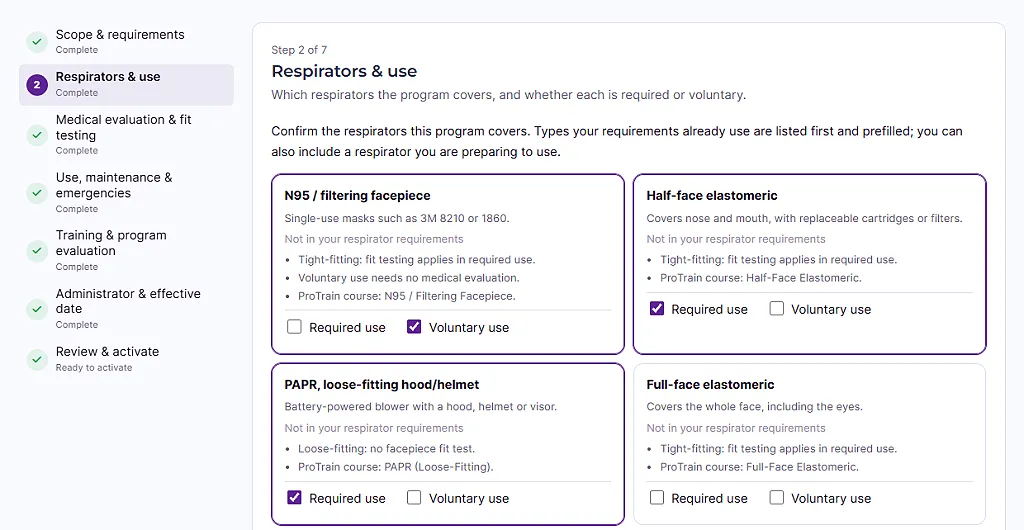
Respirators & use
Choose the respirator types the program covers and mark each as required use, voluntary use or both. Types already in your respirator requirements are listed first.
-
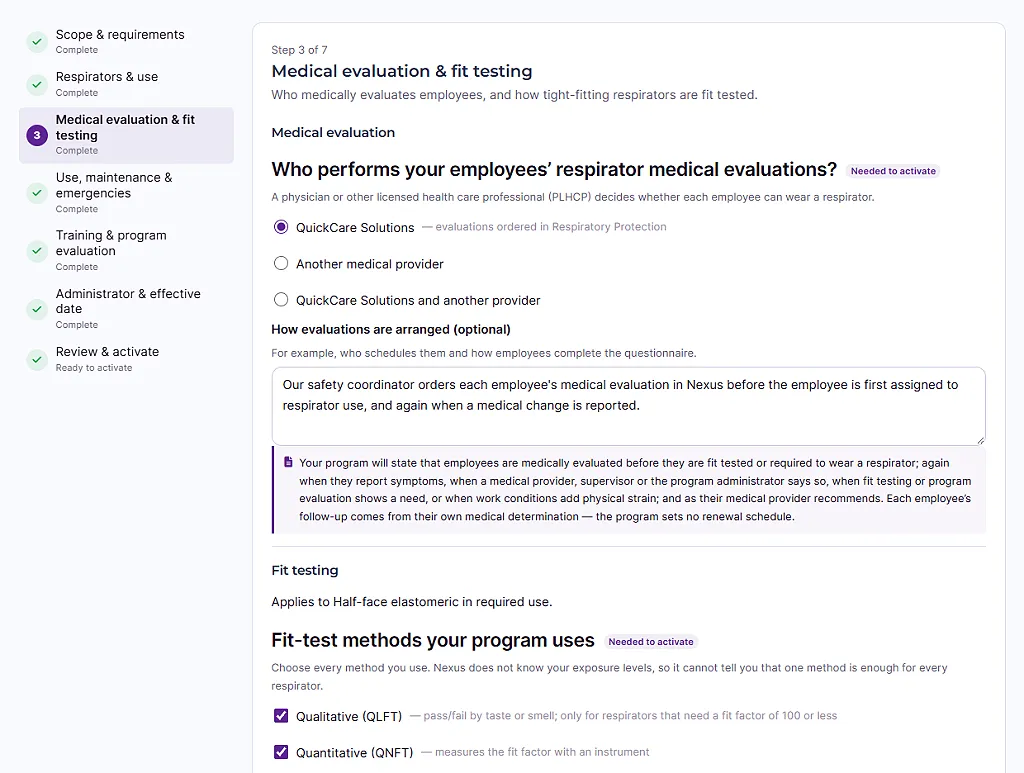
Medical evaluation & fit testing
Record who performs medical evaluations, which fit-test methods you use and how often employees are fit tested: every 12 months, or more often.
-
Use, maintenance & emergencies
Describe how respirators are worn, cleaned, stored, inspected and replaced at your worksite, and what happens in an emergency. Only the questions that apply to your respirators appear.
-
Training & program evaluation
Say how employees are trained (ProTrain online courses, your own training or an outside trainer) and how you check that the program is working.
-
Administrator & effective date
Name the program administrator and set the date the program takes effect.
-
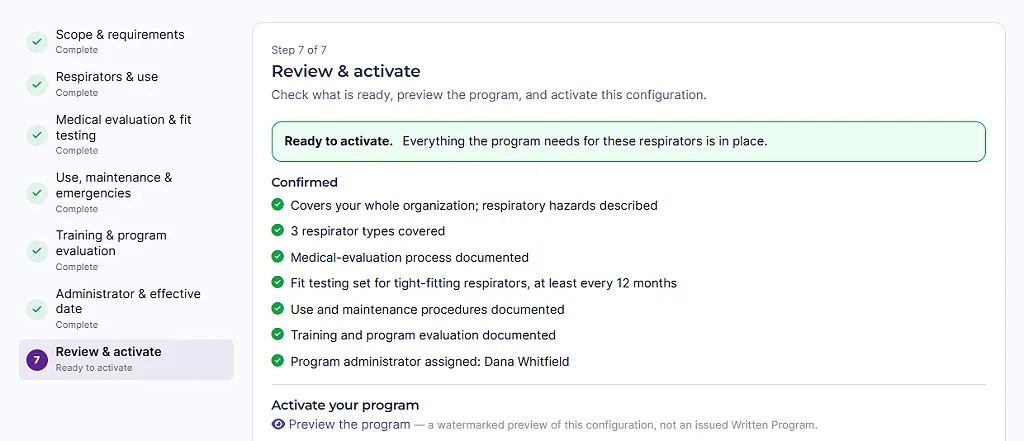
Review & activate
Review what is ready, preview the document and activate. Activating makes your setup the current configuration. It does not issue the document, and it costs nothing.
-
Saved as you go
Finish later whenever you like. A draft can be half done; completeness is checked when you review, before you activate.
Step 3 of 7
Record how medical evaluations and fit testing are handled
This step records your process, not a schedule imposed on you: who performs your employees’ medical evaluations, which fit-test methods you use, and how often employees are routinely fit tested. Whether and when an employee is re-evaluated follows the clinician’s written recommendation and, at a minimum, the events listed in 29 CFR 1910.134(e)(7), such as reported symptoms or a change in workplace conditions that substantially raises the physiological burden. The program sets no routine re-evaluation cycle.
Step 7 of 7
See what is ready before you activate
The review step lists what is confirmed, what still needs attention and what is worth a look, and links to a free preview. “Ready to activate” means the program says what it needs to say, from what the builder can see. It cannot see your workplace, and it is never a finding that you comply.
Activating a configuration records how your program runs. On its own it does not show OSHA compliance: your written program, training, evaluations and records do.
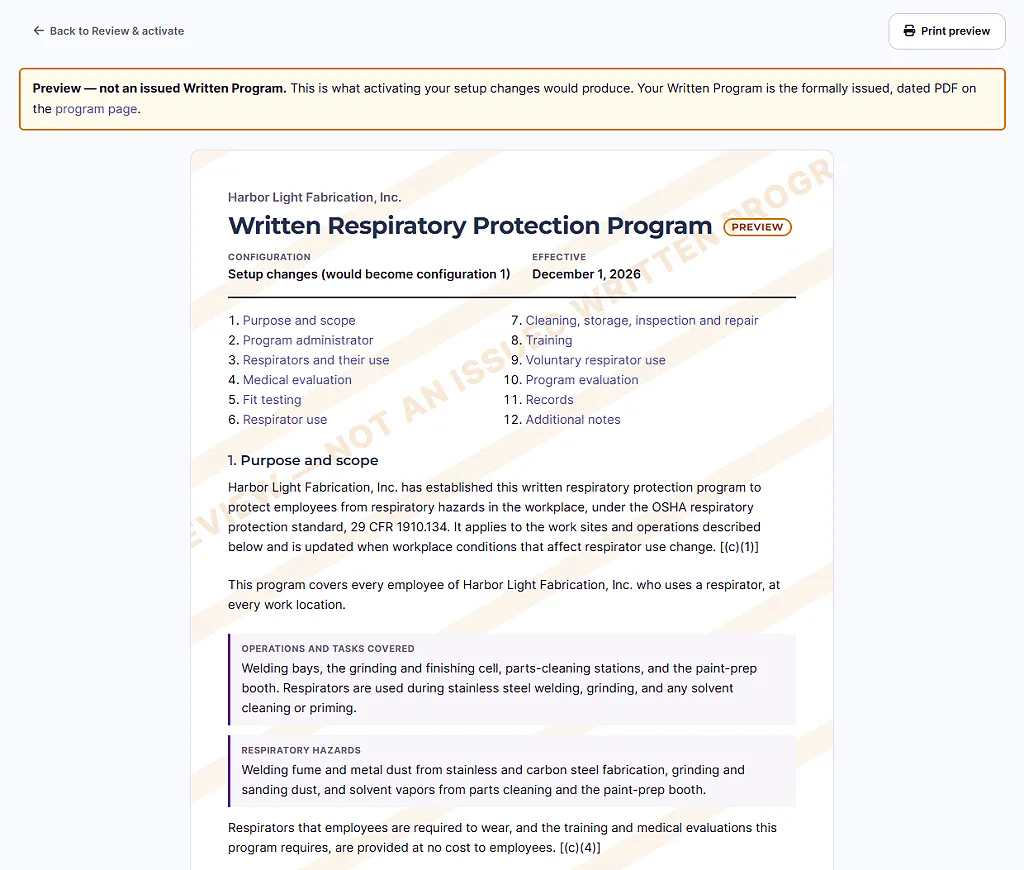
Free preview
Preview the whole document before you activate or pay
See the document your entries would produce, at any time. A preview is marked with a “Not an issued Written Program” banner and watermark, so it is never mistaken for the real thing.
After activation
Activate, then keep a history
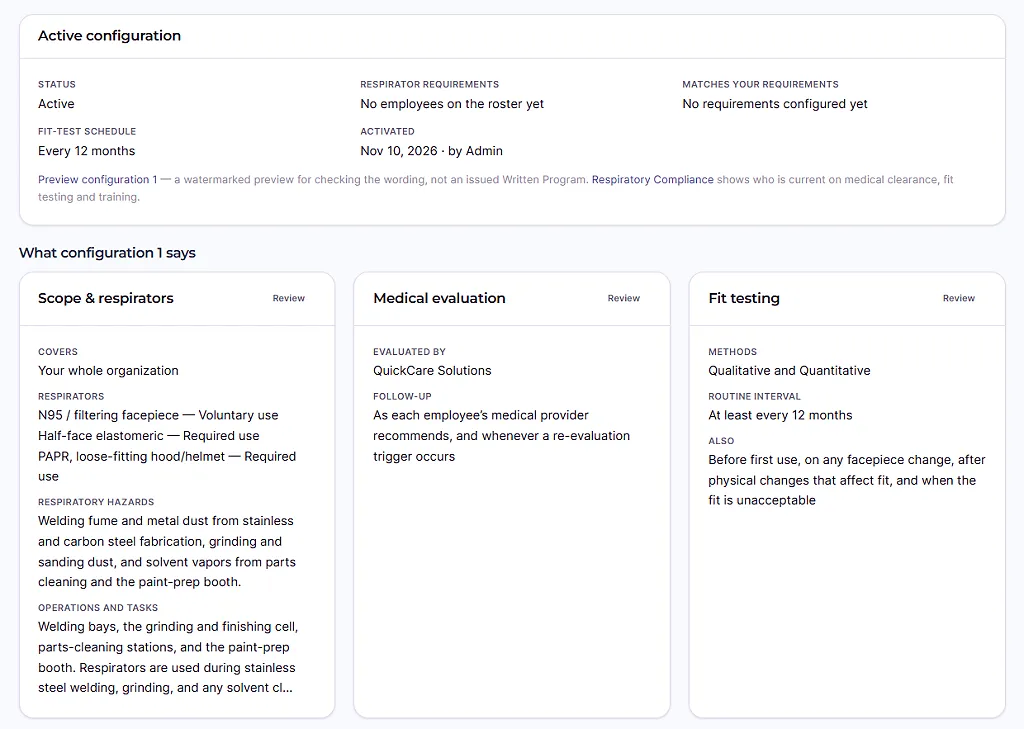
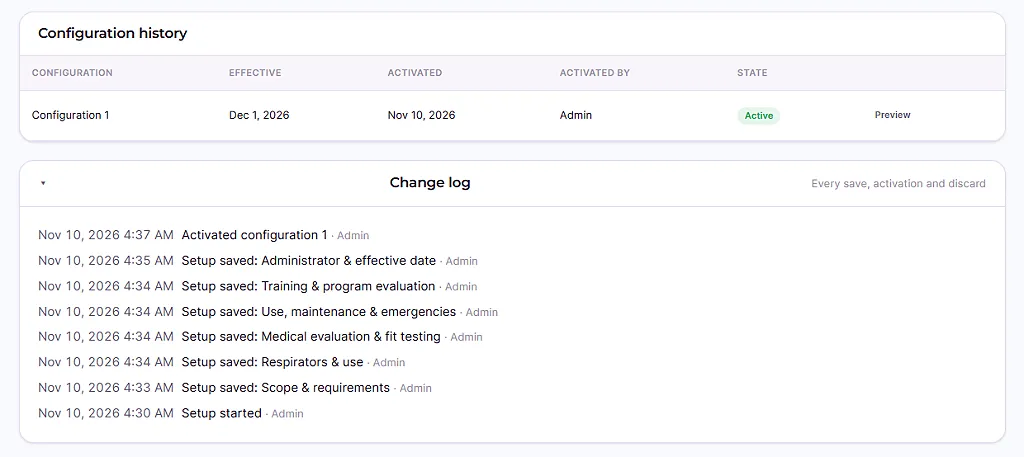
Once a configuration is active, the workspace shows a plain-language summary of what it says. Your account keeps a configuration history, and program managers also see a change log of every save, activation and discard, with the time and the role of whoever made it. Earlier configurations stay in your history exactly as they were.
person_add Create your free account Free to set up and preview.
The finished program
What the finished program contains
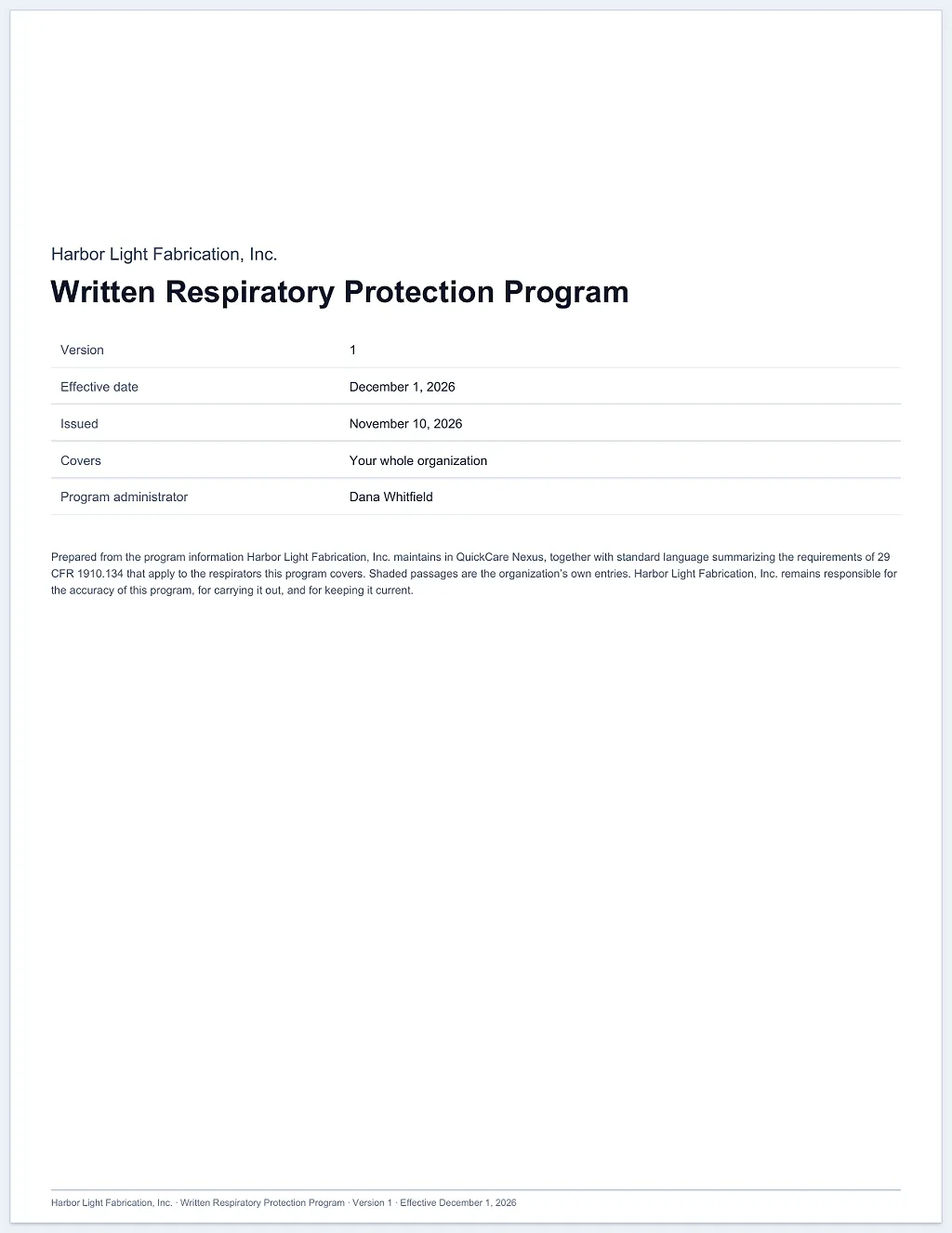
A dated PDF with a cover page, a numbered section for each part of your program that applies to the respirators you cover, adoption and signature lines for your organization, and a document history. Each issued version is kept exactly as issued and stays available to download.
The numbered sections
- Purpose and scope
- Program administrator
- Respirators and their use
- Medical evaluation
- Fit testing
- Respirator use
- Cleaning, storage, inspection and repair
- Breathing air (only when supplied-air respirators or SCBA are covered)
- Training
- Voluntary respirator use (only when any use is voluntary)
- Program evaluation
- Records (when any use is required)
- Additional notes (only when you add notes)
- Adoption and effective date (always last)
Sections that do not apply to the respirators you cover are left out, so the numbers shift. The last numbered section is the adoption and effective date, with blank signature and date lines for your organization, followed by a document history of every issued version.
Standard language and your own entries
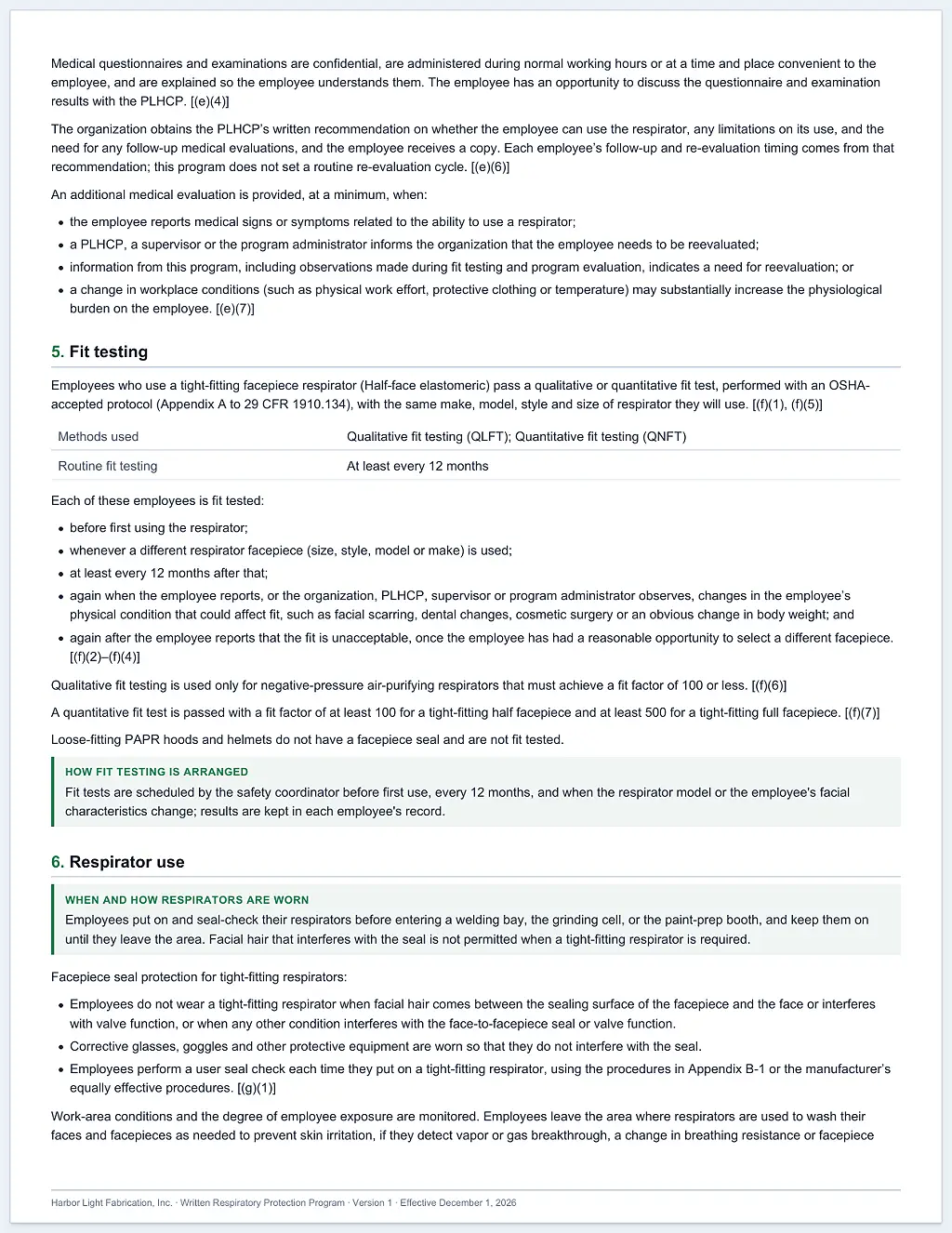
- Standard language summarizes 29 CFR 1910.134, with bracketed paragraph references such as [(c)(1)].
- Your own entries appear in shaded boxes. A required entry you leave blank prints as “Not documented in this version.”
Versions and history
Your program changes. Your history keeps up.
Two kinds of history sit side by side: the configurations you activate, and the formally issued versions of the document.
-
history
Configuration history and change log
Every activation creates the next numbered configuration. Earlier configurations stay in your history exactly as they were, and the change log records each save, activation and discard.
-
lock
Issued versions are kept exactly as issued
Each issued version is dated and numbered 1, 2, 3, and it is never edited or replaced. Earlier versions stay available at no charge, and downloading any issued version, and viewing your history, never costs anything.
-
note_add
When a new issued version is needed
An issued version is never edited. When your active configuration changes anything the document states, even a phone number, you need a new issued version, which is a separate one-time payment. When it changes nothing the document states, you do not need one.
-
check_circle
What does not need a new issued version
A new configuration number on its own does not, and neither does an edit to something the document does not print. When nothing the document states changes, your issued version stays current. Before you pay, the program workspace lists the setup steps that changed.
Pricing
Free to set up and preview. You pay when you issue it.
A one-time payment for your organization's formally issued Written Program. Not per employee; no subscription.
-
Initial issuance
Your first issued program
$199 one time
Your organization’s first formally issued Written Program: a dated, numbered PDF generated from your active configuration.
-
New issued version
A later version after your program changes
$99 one time
Offered only when your active configuration changes something your latest issued document states. Your earlier versions stay available at no charge.
These are QuickCare’s standard rates. Pay $199 once by card when you issue your program; your price is shown before you pay. A later new issued version is $99, also once, and is offered only when your active configuration changes what the document states. You pay by card on a secure checkout page that you open from your account, and nothing is charged before you confirm there.
savings Free
- Program setup, with drafts saved as you go
- The watermarked preview
- Activating a configuration
- Configuration history and change log
- Downloading any issued version
task_alt What you get
A dated PDF with a cover page, a numbered section for each part of your program that applies to the respirators you cover, adoption and signature lines for your organization, and a document history. See the numbered sections.
block Not included
It does not include medical evaluations, fit testing, respirator training, a hazard assessment, exposure monitoring or a professional review of your program. Medical evaluations, fit testing and training are separate services that you order on their own, and the hazards your program describes come from your own evaluation of your workplace.
Who can set up and who can issue. Admins, Super Admins, Account Administrators and HR can set up the program. Admins, Super Admins and Account Administrators can issue a version and pay for it. Anyone in your organization with access to Respiratory Protection can view and download issued versions.
Enterprise. Enterprise agreements may include issuance or set their own price. If your organization has an enterprise agreement with QuickCare, or is discussing one, contact us before you issue it. Ask about enterprise pricing
person_add Create your free account Your price is shown in your account before you pay. Already have an account? Sign in
Compared with a free template
A free template is a fair place to start
OSHA publishes a free sample program in its Small Entity Compliance Guide, listed on its sample programs page, and 29 CFR 1910.134(c) points employers to it. Generic templates are legitimate too. The question is how much work is left once you have downloaded one.
| What you are comparing | A free generic template | The QuickCare program builder |
|---|---|---|
| Starting point | A blank or sample document, such as OSHA’s free sample program. | Guided questions for each part of your program, with standard language already written for the respirators you cover. |
| Making it worksite-specific | You replace the example text with your own procedures and decide which sections apply. | Sections that do not apply to your respirators are left out, and your own entries appear in shaded boxes. |
| Checking what is missing | Usually left to you. | Readiness checks list what still needs attention before you activate. They check completeness, not whether the program is right for your workplace. |
| Keeping versions | Whatever you save and name yourself. | Configuration history, a change log, and numbered, dated issued versions kept exactly as issued. |
| A dated formal copy | Whatever you save or print. | A dated PDF with adoption and signature lines and a document history. |
| Cost | Often free. | Free to set up and preview, then a one-time price for each formally issued version. |
| What it does not do | Your hazard assessment, medical evaluations, fit tests and training. | The same. No document, including this one, makes an organization compliant. |
Free template or program builder? Read the guide arrow_forward
Your responsibilities
Your responsibilities and the limits of a written document
Your organization remains responsible for the accuracy of the program, for carrying it out and for keeping it current. A document records how you run your program. These duties stay with you.
- A qualified administratorName a program administrator with the training or experience to oversee a program of your size and complexity. 29 CFR 1910.134(c)(3).
- Hazards and respirator selectionIdentify and evaluate the respiratory hazards and choose respirators for them. The builder records the hazards you describe; it does not evaluate your workplace. (d).
- Medical evaluationA physician or other licensed health care professional (PLHCP) evaluates each employee before fit testing or required use. (e).
- Fit testingTight-fitting respirators are fit tested before first use, when a different facepiece is used, and at least annually. (f).
- TrainingEmployees are trained before required use and at least annually. (k).
- No cost, and recordsRespirators, training and medical evaluations are at no cost to employees, and you keep the records the standard requires, including a copy of the current written program. (c)(4), (m).
Keep the program current
The program has to be updated as necessary when workplace conditions that affect respirator use change, such as new respirators, different tasks or changes to fit testing. 29 CFR 1910.134(c)(1). The standard sets no fixed annual review of the written program itself. Fit testing and training are what recur annually, and program evaluation happens as necessary, with regular consultation of the employees who use respirators. (l).
When something changes, update your setup. When what the document states changes, issue a new version.
info Not a determination of compliance
QuickCare has not reviewed or certified your program, and a written program is not a determination that your organization complies with OSHA requirements. You remain responsible for its content and for carrying it out.
public Federal standard only
The document summarizes the federal standard, 29 CFR 1910.134. It does not cite California's Title 8 section 5144 or other state-plan standards, so employers in California and other state-plan states should check their program against their state's standard.
Medical evaluations, fit testing and training
How it fits with medical evaluations, fit testing and training
The program is a document and a set of records. It never orders or schedules anything by itself. A few connections are real:
-
checklist
Respirator types are suggested for you
When you place a new respiratory medical evaluation order, your active program’s respirator types are filled in as a starting point. In the fit-test booking planner they are offered back to you, and you accept or decline them.
-
event_repeat
Fit-test due dates follow your interval
The routine fit-test interval you choose, 12 months or shorter, sets the next-due date shown for each passed fit test.
-
fact_check
Your requirements are checked against it
Your program is checked against your organization’s respirator requirements. If a requirement names a respirator use or work site the program does not cover, activation is blocked or the active program is flagged for review.
-
school
ProTrain course names appear in the document
If you choose ProTrain online courses for training, the document lists the matching ProTrain course names.
-
folder_open
Issued versions are kept in Records
Every issued version appears in your account’s Records, ready to download.
The services themselves are separate
In person
QuickCare Respirator Package
For in-person fit testing at your worksite, QuickCare’s separate Respirator Package includes:
- check_circle Respirator medical evaluation and clearance process
- check_circle Blood pressure assessment
- check_circle Pulmonary function testing (PFT)
- check_circle Physical respirator fit testing
- check_circle Respirator training
Available throughout the greater San Francisco Bay Area. QuickCare comes to your workplace or jobsite, so employees do not travel to a clinic. Medical clearance is determined by the reviewing clinician. Buying the package does not guarantee medical approval.
Online
ProTrain by QuickCare
Need an online-only option? ProTrain by QuickCare is a separate virtual service, available in all 50 states, with its own pricing. It provides online respirator medical evaluations and clearance, online respirator training and respiratory records management. It does not include blood pressure measurement, pulmonary function testing or physical fit testing, and an online evaluation is not a fit test. Learn about ProTrain or ask about ProTrain for your team.
Where employers use it
Any employer whose people use respirators at work
The need follows the work, not the industry. These are common places where respirator use is required.
-
engineering
Construction
Crews who use respirators for dust, fumes or coatings need a program that matches the jobsite. Construction work follows the same respirator requirements as general industry, and silica work adds separate duties, such as a written exposure control plan, that a respirator program does not replace.
-
precision_manufacturing
Manufacturing, welding, grinding and coatings
Welding fume, metal and grinding dust, and solvent or coating vapors are common reasons for required respirator use. The program records where respirators are used, which types, and how they are fit tested, cleaned and stored.
-
local_hospital
Healthcare and laboratories
Where staff use N95 or elastomeric respirators, the program records which respirators are used, who evaluates employees medically and how fit testing is arranged. It applies whenever the employer requires the use.
-
warehouse
Warehouses, offices and other sites
A program is needed only if employees actually use respirators, because you require it or the hazard makes it necessary. If employees only choose to wear filtering facepieces, the narrow voluntary-use exception may apply (voluntary use of anything other than a dust mask also brings the (c)(2)(ii) elements).
From the first click to program setup
How to start
There is no one-click start. "Create your free account" opens account creation. After you verify your email and sign in, you set up your organization, then your program.
Create a free QuickCare account, verify your email, then sign in.
When asked "How will you use QuickCare?", choose "Set up an organization", enter your organization name and select "Create organization". Do not choose "Use QuickCare for myself": a personal workspace cannot open the Written Program.
QuickCare then opens the Written Program page for your new organization. Select "Start program setup".
Work through the seven setup steps, preview your document and activate your configuration. Issue it only when you are ready.
checklistHave these ready: where and how respirators are used at your worksite, which respirator types you cover, who does your medical evaluations and fit tests, how employees are trained, and your program administrator's name.
person_offWhy not “Use QuickCare for myself”? The Written Program is for organizations. A personal workspace cannot open it, and we have not found a way to add an organization to a personal workspace afterwards.
group_addJoining an existing organization? If your organization already uses QuickCare, ask an administrator there to invite you instead of creating a second organization.
loginAlready have an account? If you are already signed in and your organization has Respiratory Protection, the button takes you straight to its Written Program page. If you have an account, use "Already have an account? Sign in" instead.
dashboardLanded on the dashboard instead? If you land on the QuickCare dashboard instead, open the apps menu (the grid icon at the top right), choose "Respiratory Protection", then open "More" in the top bar and choose "Written Program".
Questions
Questions employers ask before they start
Does this program make my organization compliant?
QuickCare has not reviewed or certified your program, and a written program is not a determination that your organization complies with OSHA requirements. You remain responsible for its content and for carrying it out.
The document summarizes the parts of 29 CFR 1910.134 that apply to the respirators you cover. Whether your organization complies depends on what it actually does: your hazard evaluation, medical evaluations, fit testing, training and records.
Do we need a written program if we only use N95 respirators?
It depends on whether the use is required. If your organization requires N95 respirators, or the hazard makes respirators necessary, you need a written program, medical evaluations, fit testing and training. A narrow exception covers employees whose only respirator use is voluntary use of filtering facepieces, such as dust masks. For them you must still decide that voluntary use will not itself create a hazard and give them the information in Appendix D to 29 CFR 1910.134.
What does the price cover, and is there a subscription?
$199 once for the first issued program, $99 once for a later version. There is no subscription, and the price is not per employee.
You get the issued PDF described under what the finished program contains. What is not included is listed in the pricing section.
Do we pay again every time we edit our program?
Program setup, edits in setup, previews, activating a configuration, configuration history and downloads of any issued version cost nothing. You pay only when you have a version formally issued.
An issued version is never edited. When your active configuration changes anything the document states, even a phone number, you need a new issued version, which is a separate one-time payment. When it changes nothing the document states, you do not need one.
What triggers the second price?
A new issued version is offered only when your active configuration changes something your latest issued document states. The program workspace lists the setup steps that changed before you pay. The standard price for a new issued version is $99, paid once.
When nothing the document states has changed, you do not need a new version. Earlier versions stay available at no charge.
Who can set it up, and who can issue it?
Admins, Super Admins, Account Administrators and HR can set up the program. Admins, Super Admins and Account Administrators can issue a version and pay for it. Anyone in your organization with access to Respiratory Protection can view and download issued versions.
Previews are for the people who can set up the program, and only once a draft is started. Until you have an account, the sample program is the only preview.
Can we try it before we pay?
Yes. You need a free QuickCare account and an organization. Program setup, edits in setup, the watermarked preview, activating a configuration, your configuration history and downloads of any issued version cost nothing, and nothing is charged before you confirm at checkout. You pay only when you choose to have a version formally issued.
Does the program cover California requirements?
The document summarizes the federal standard, 29 CFR 1910.134. It does not cite California's Title 8 section 5144 or other state-plan standards, so employers in California and other state-plan states should check their program against their state's standard.
Does it order medical evaluations or schedule fit tests?
No. The program never orders or schedules anything by itself. Its real connections are narrow: it fills in your respirator types as a starting point on a new respiratory medical evaluation order, and offers them back in the fit-test booking planner, where you accept or decline them. Your routine fit-test interval sets the next-due date shown for passed fit tests. Your program is checked against your organization’s respirator requirements. And the document lists the matching ProTrain course names if you choose ProTrain online courses for training.
Can one program cover several worksites?
Yes. In the first setup step you choose whether the program covers your whole organization or specific work sites from your account’s work-site list. The standard calls for worksite-specific procedures, so describe in your own entries how respirators are actually used and handled at your sites.
Will QuickCare review my program?
No. The document is generated automatically from your entries and standard language. Nobody at QuickCare reviews, edits or certifies it, and the builder cannot see your workplace. If you want a qualified safety professional to review your program, arrange that separately.
What do we do after we receive the PDF?
Adopt it, put it into practice and keep it current. The issued PDF has blank signature and date lines under its adoption statement for your program administrator; QuickCare does not sign it. Carry out the procedures it describes, keep the records the standard requires and make a copy of the current program available to affected employees and to OSHA on request.
Is the document available in languages other than English?
No. The issued document is in English only.
What about enterprise agreements?
Enterprise agreements may include issuance or set their own price. If your organization has an enterprise agreement with QuickCare, or is discussing one, contact us before you issue it.
Related guides
Read before you build
Plain-language guides to what a written respiratory protection program has to do.
- What a respiratory protection program must containThe elements of 29 CFR 1910.134(c) and what each asks of an employer.
- Free template or program builder?What a generic template leaves for you to finish, and what neither one does.
- Cal/OSHA 5144 and your written programHow California’s section 5144 relates to the federal standard.
- Written programs for constructionJobsite respirator use, and the silica duties that are separate.
- Reviewing and updating your programWhat makes an update necessary, and what the standard says about review.
- Voluntary respirator use and Appendix DWhen the filtering-facepiece exception applies, and what you still owe.
Build your program when you are ready
Free to set up and preview. You pay only when you issue the final, dated PDF.